前回で FGS の基本的な部分を確認しました。
今回は以下の設定項目を確認したいと思います。

とはいえ、基本を押さえるという意味で、Allowed Actor Class, Allowed Component Classes を確認することにします。
Allowed Actor Classes を調べる
Static Mesh Actor の場合
Static Mesh Actor 継承の BP の場合は特に何もしなくても条件を満たし、FGS の対象になりました。

Actor の場合
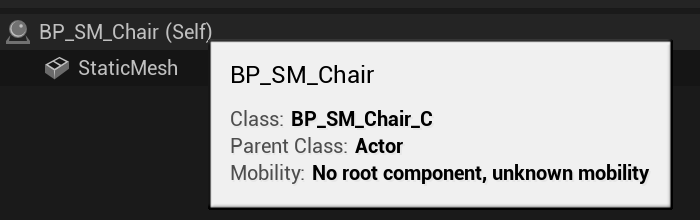
Actor の場合は、内部が Static Mesh (Component) であっても FGS の対象にならないようです。

LogFastGeoStreaming: ------------------------------------------------------------------------
LogFastGeoStreaming: - FastGeoStreaming Debug Mode: Transformation on 1 selected actors
LogFastGeoStreaming:   * Can't transform: Actor BP_SM_Chair_C_UAID_A8A1596048F9C08002_1571083478 class is an unsupported class (BP_SM_Chair_C)
LogFastGeoStreaming:   -  Non-Transformable Actors       = 1 (100.0%)
LogFastGeoStreaming: ------------------------------------------------------------------------
unsupported class となっているようです。
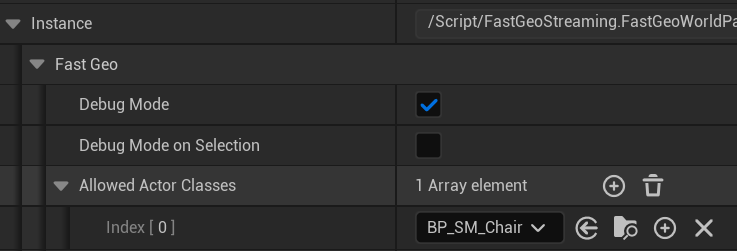
Allowed Actor Classes に追加する
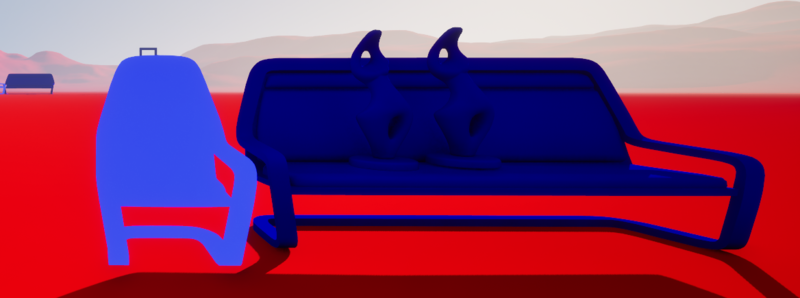
追加したことで FGS の対象になったようです。
Allowed Actor Classes にしても対象外になるケース
Allowed Actor Classes になっていても、そもそも FGS の対象外になるようなものは除外されます。
以下は Static Mesh が Movable / Stationary の状態の場合です。
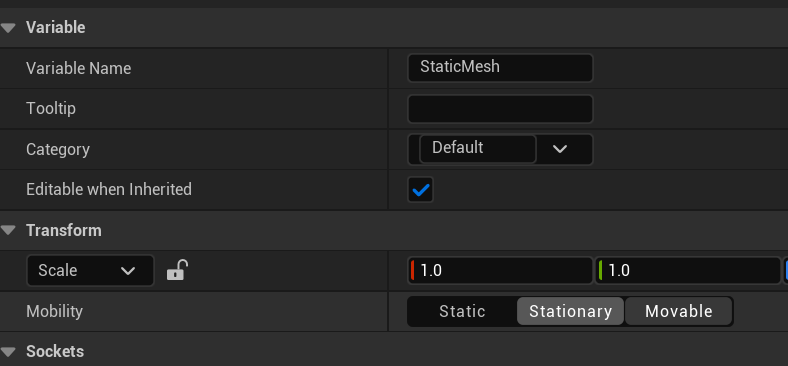

簡単な例ですが、Allowed Actor Classes に関しては、ある程度直感的に利用できるようです。
Allowed Actor Components を調べる
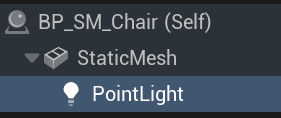
まず、試しに以下のように PointLight と SplineMesh をそれぞれを付与してみます。
| BP_SM_Chair | BP_SM_Chair1 |
|---|---|
 |
 |
すると、SplineMesh が付いている方は FGS の対象になりませんでした。
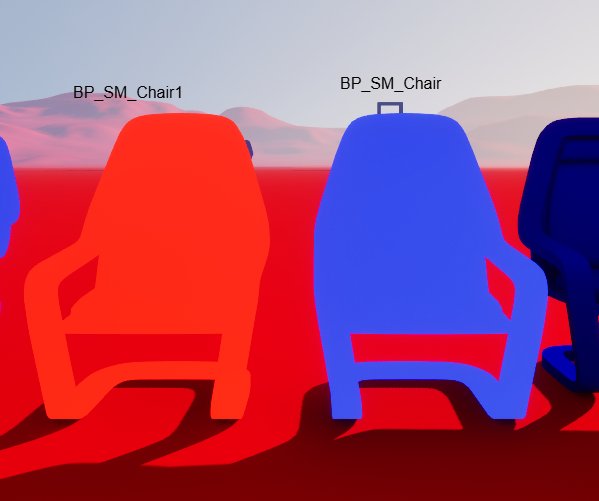
ログを見ると、SplineMesh class is child of a built-in disallowed class とあります。
LogFastGeoStreaming: ------------------------------------------------------------------------
LogFastGeoStreaming: - FastGeoStreaming Debug Mode: Transformation on 1 selected actors
LogFastGeoStreaming:   * Can't transform: Component BP_SM_Chair1_C_UAID_A8A1596048F9C08002_1502251477.SplineMesh class is child of a built-in disallowed class (SplineMeshComponent)
LogFastGeoStreaming:   * Can't transform: Actor BP_SM_Chair1_C_UAID_A8A1596048F9C08002_1502251477 is a Blueprint and can't be fully transformed.
LogFastGeoStreaming:   -  Non-Transformable Actors       = 1 (100.0%)
LogFastGeoStreaming: ------------------------------------------------------------------------
では、PointLight を付けた方を見てみます。BillboardComponent が unsupported になって、なぜか Non-Transformable Actors になってしまいました。
これは、PIE の実行中ではなくビューポートの状態で選択したので、BillboardComponent が代わりに表示されているためにこのような結果になったのかもしれません。
実際、PIE での実行時はこのログは出ません。
LogFastGeoStreaming: ------------------------------------------------------------------------
LogFastGeoStreaming: - FastGeoStreaming Debug Mode: Transformation on 1 selected actors
LogFastGeoStreaming:   * Can't transform: Component BP_SM_Chair_C_UAID_A8A1596048F9C08002_1571083478.BillboardComponent_2 class is unsupported (BillboardComponent)
LogFastGeoStreaming:   * Can't transform: Actor BP_SM_Chair_C_UAID_A8A1596048F9C08002_1571083478 is a Blueprint and can't be fully transformed.
LogFastGeoStreaming:   -  Non-Transformable Actors       = 1 (100.0%)
LogFastGeoStreaming: ------------------------------------------------------------------------
ちなみに、SplineMesh ではなく、Spline(Component) にすると以下のようなログになります。disallowed ではなく unsupported の表示です。
LogFastGeoStreaming: ------------------------------------------------------------------------
LogFastGeoStreaming: - FastGeoStreaming Debug Mode: Transformation on 1 selected actors
LogFastGeoStreaming:   * Can't transform: Component BP_SM_Chair1_C_UAID_A8A1596048F9C08002_1502251477.Spline class is unsupported (SplineComponent)
LogFastGeoStreaming:   * Can't transform: Actor BP_SM_Chair1_C_UAID_A8A1596048F9C08002_1502251477 is a Blueprint and can't be fully transformed.
LogFastGeoStreaming:   -  Non-Transformable Actors       = 1 (100.0%)
LogFastGeoStreaming: ------------------------------------------------------------------------
どうやら明確に allowed/disallowed だけではなく supported/unsupported の判定があるようです。
ドキュメントに戻る
どうやら、試してみるだけではわからない部分がありそうなのでドキュメントを確認します。
World Building Guide の FGS の部分を見ると、以下のような箇所が見つかります。 World Building Guide | Epic Developer Community
Partial/Full Transformation
- FastGeo transformer supports partial transformation of actors: only supported components of the actor are transformed.
- The actor is removed from its level (from the world partition cell) if it’s considered to be fully transformed.For that to be true, any of these conditions must be true:
- All components were transformed
- The remaining components can be ignored (see IgnoredRemainingComponentClasses & IgnoredRemainingExactComponentClasses in Transformation Setup)
- The only remaining component is the root component and is a SceneComponent
- IsFullyTransformedActorDeletable: User can implement its own CellTransformer that derives from this one and override the method IsFullyTransformedActorDeletable to prevent an actor from being deleted.
Actor restrictions
- Disallowed actor classes: Disallowed actor classes can prevent actors from being transformed.
- Actor Tags: An actor is excluded if its actor tags contain either ‘CellTransformer_IgnoreActor’ or ‘NoFastGeo’.
- Non-spatially loaded: Since transformers are only applied on generated world partition cells, non-spatially loaded actors can’t be transformed (they will be part of the persistent level).
- Replicated: Replicated actors won’t be transformed as FastGeo doesn’t have any custom replication mechanism.
- Non-Static RootComponent Mobility: Actors with a root component which has its mobility not set to Static are not supported.
- Editor-only: Editor-only actors are not supported.
- Child actors: Child actors and actors with child actors are not supported.
- Blueprint with logic: Blueprint actors with logic are not supported. Those with only the construction script are fine.
- Non-fully transformed Blueprint: Partially transformed blueprint actors are not supported.
- Actor References: An actor is excluded if referenced by another actor that is not transformed or partially transformed.
- IsActorTransformable: User can implement its own CellTransformer that derives from this one and override the method IsActorTransformable to decide if an actor can be excluded from the transformation.
Component restrictions
- Disallowed component classes: Disallowed component classes can prevent actors from being transformed.
- Editor-only: Editor-only components are not supported.
- LODParentPrimitive: Components with a valid LODParentPrimitive are not supported.
- Non-Static Mobility: Components which have its mobility not set to Static are not supported.
- No StaticMesh: StaticMeshComponents with an invalid StaticMesh are not supported.
- No Instances: InstancedStaticMeshComponents with no instances are not supported.
- Non-Nanite HISMC: Hierarchical instanced static mesh components that are using multiple LODs are not supported.
- No Async Collision: Components with collisions that don’t support asynchronous physics state creation and destruction are not supported.
- No collision & invisible: Invisible components with no collision are not supported.
- Skinned Mesh - No Animation: Animated skeletal mesh component / instanced skinned mesh components are not supported.
- Skinned Mesh - No Collision: Skinned mesh with collision or that are navigation relevant are not supported.
- IsComponentTransformable: User can implement its own CellTransformer that derives from this one and override the method IsActorTransformable to decide if an actor can be excluded from the transformation.
FGS の変換に関する細かいルールが書かれているようです。Actor Tags でも指定できるんですね。
IsFullyTransformedActorDeletable の項には、独自の CellTransformer を実装すれば、変換されてもアクターが削除されないようにできるとも書かれていますね。
特定の Component への言及
Component restrictions の方に、StaticMeshComponents, InstancedStaticMeshComponents, Skinned Mesh (Animated skeletal mesh component / instanced skinned mesh components) のワードが出ていることが分かります。
InstancedStaticMeshComponents は、まさに RCTs の変換後のものと一致します。
InstancedStaticMeshComponents を付けてみる
以下のように InstancedStaticMeshComponents を追加した状態にすると、確かに FGS の対象になりました。

ただし、最低限 1 つの Instance は生成しておかなければいけません。

この結果から、 RCTs で InstancedStaticMesh 化されたものが、FGS の変換対象になっていたことが裏付けられました。
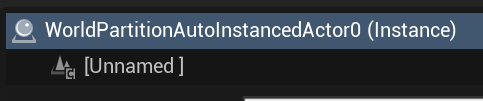
改めてですが、RCTs で変換されたものは以下のようになります。

それが、FGS でさらに変換され以下のようになります。
再び、disallowed, unsupported に戻る
ドキュメントからは決定的な情報が得られなかったので、UE のコードの方を確認してみます。
現時点でのコードですが、FastGeoWorldPartitionRuntimeCellTransformer を見てみます。
IsAllowedComponentClass, CanTransformComponent, IsAllowedActorClass, CanTransformActor 等が該当しそうです。
unsupported の判定
IsAllowedComponentClass の先頭で、FastGeo::GetFastGeoComponentType に該当するかをチェックしています。
// FastGeoWorldPartitionRuntimeCellTransformer.cpp
FFastGeoElementType GetFastGeoComponentType(TSubclassOf<UPrimitiveComponent> InClass)
{
    static const TMap<TSubclassOf<UPrimitiveComponent>, FFastGeoElementType> FastGeoComponentTypeMapping =
    {
        { UStaticMeshComponent::StaticClass(), FFastGeoStaticMeshComponent::Type },
        { UInstancedStaticMeshComponent::StaticClass(), FFastGeoInstancedStaticMeshComponent::Type },
        { USkinnedMeshComponent::StaticClass(), FFastGeoSkinnedMeshComponent::Type },
        { UInstancedSkinnedMeshComponent::StaticClass(), FFastGeoInstancedSkinnedMeshComponent::Type }
    };

    // Walk the component class hierarchy and look for a fast geo mapping
    for (UClass* Class = InClass; Class; Class = Class->GetSuperClass())
    {
        if (const FFastGeoElementType* Found = FastGeoComponentTypeMapping.Find(Class))
        {
            return *Found;
        }
    }

    return FFastGeoElementType::Invalid;
}
上記の通りで、StaticMeshComponent InstancedStaticMeshComponent, SkinnedMeshComponent, InstancedSkinnedMeshComponent が対象となっており、これがドキュメントの方で言及されていた Component 群であることが分かります。
disallowed の判定
IsAllowedComponentClass メソッドの内部の判定です。
// FastGeoWorldPartitionRuntimeCellTransformer.cpp
for (TSubclassOf<UActorComponent> DisallowedComponentClass : BuiltinDisallowedComponentClasses)
{
    if (ComponentClass->IsChildOf(DisallowedComponentClass))
    {
        return { EFastGeoTransform::Reject, [InComponent, DisallowedComponentClass] { return FString::Printf(TEXT("Component %s class is child of a built-in disallowed class (%s)"), *FastGeo::GetComponentShortName(InComponent), *DisallowedComponentClass->GetName()); } };
    }
}
どうやら、設定としての DisallowedActorClasses とは別にビルトインの設定があるようです。
# FastGeoStreaming.ini
+BuiltinDisallowedComponentClasses=/Script/CoreUObject.Class'/Script/Foliage.InteractiveFoliageComponent'
+BuiltinDisallowedComponentClasses=/Script/CoreUObject.Class'/Script/Landscape.LandscapeNaniteComponent'
+BuiltinDisallowedComponentClasses=/Script/CoreUObject.Class'/Script/Landscape.LandscapeMeshProxyComponent'
+BuiltinDisallowedComponentClasses=/Script/CoreUObject.Class'/Script/Water.WaterBodyMeshComponent'
+BuiltinDisallowedComponentClasses=/Script/CoreUObject.Class'/Script/Engine.SplineMeshComponent'
確かに SplineMeshComponent が含まれています。
コンポーネントごとの判定
IsAllowedComponentClass や CanTransformComponent の判定は、一つが Reject 判定になったからといって FGS の変換が即失敗するわけではありません。Ignore の設定等もあるためです。
// FastGeoWorldPartitionRuntimeCellTransformer.cpp
// Gather transformable components
TArray<UActorComponent*> TransformResults[EnumToIndex(EFastGeoTransform::MAX)];
InActor->ForEachComponent<UPrimitiveComponent>(false, [this, &TransformResults](UPrimitiveComponent* PrimitiveComponent)
{
    FFastGeoTransformResult TransformComponentResult = CanTransformComponent(PrimitiveComponent);
    TransformResults[TransformComponentResult.GetResultIndex()].Add(PrimitiveComponent);
});
上記は CanTransformActor の一部ですが、ここで CanTransformComponent を呼び出していることが分かります。(IsAllowedComponentClass はさらにこの内部で呼ばれている)
ここで注目するのは UPrimitiveComponent を対象にしていることでしょう。
というのも、PointLightComponent は当然 StaticMeshComponent 等には該当しないので、FGS の変換の対象にはならないように考えていたのですが、実際には PointLightComponent があっても変換されます。
Unreal Engine のコンポーネント | Unreal Engine 5.6 ドキュメンテーション | Epic Developer Community
Light や Camera のコンポーネントはジオメトリを含むような PrimitiveComponent を継承しないため、 そもそも CanTransformComponent のチェック対象外となっていた と考えられます。
FGS の変換対象チェックの流れと設定項目
変換のスタート CanTransformActor
ここがスタート地点です。
まず IsAllowedActorClass のチェックが入ります。
この内部で、設定項目にある DisallowedActorClasses, DisallowedExactActorClasses, AllowedActorClasses, AllowedExactActorClasses が順にチェックされます。(ビルトインの設定も適用されます)
さらに、ドキュメントにあった FastGeo のタグもチェックされます。
再び、CanTransformActor に戻って、ドキュメントにあった Actor restrictions のチェックが行われます。
それが終わるとコンポーネントのチェックです。
コンポーネントチェックのスタート CanTransformComponent
ここでも先頭で IsAllowedComponentClass のチェックが入ります。
前述した FastGeo::GetFastGeoComponentType のチェックの後は、DisallowedComponentClasses, DisallowedExactComponentClasses, AllowedComponentClasses, AllowedExactComponentClasses が順にチェックされます。(ビルトインの設定も適用されます)
再び、CanTransformComponent に戻って、ドキュメントにあった Component restrictions のチェックが行われます。
設定項目を使う点での注意
- Actor のチェックが先に行われることを念頭にいれる
- Actor も Component も、Allow, Disallow にはビルトインの設定が存在することを意識する
- Allow, Disallow, Remaining の設定以外にもドキュメントにある制約が多数あることを意識する
FGS を確認してみて
ここまで RCTs、FGS を見てきましたが、便利に利用できる反面、分からず使っていると突然 InstancedStaticMesh になっていたり、FGS に変換すると FGS 管理化におかれてオブジェクトが Outliner からも消えていたりと戸惑うこともありそうです。
一方で、基本的には「静的で不変なジオメトリ」を対象にしたパフォーマンス向上のための機能なので、特に広いワールドを作りたい場合には積極的に使いたい機能になりそうです。
ただ、まだまだ確認できていない機能はありそうなので、また利用するときには気を付けて確認したいと思います。
